Secure company sign-in, departments, server-side permissions, versions, system check and demo data.
Why it mattersAll modules share one platform: one account, one project record, one set of permissions. Data is never re-entered between departments, and each person sees exactly the work assigned to them.
Company sign-in & approval
Self-registration only with a company e-mail domain; accounts stay pending until an administrator approves them. Strong password policy, Argon2id hashing and brute-force lock-out.
Dashboard & grouped menu
One screen with system indicators, recent projects and a drop zone. The menu is grouped by module, collapses to icons and works on phones and tablets in the workshop.
Versions & project reuse
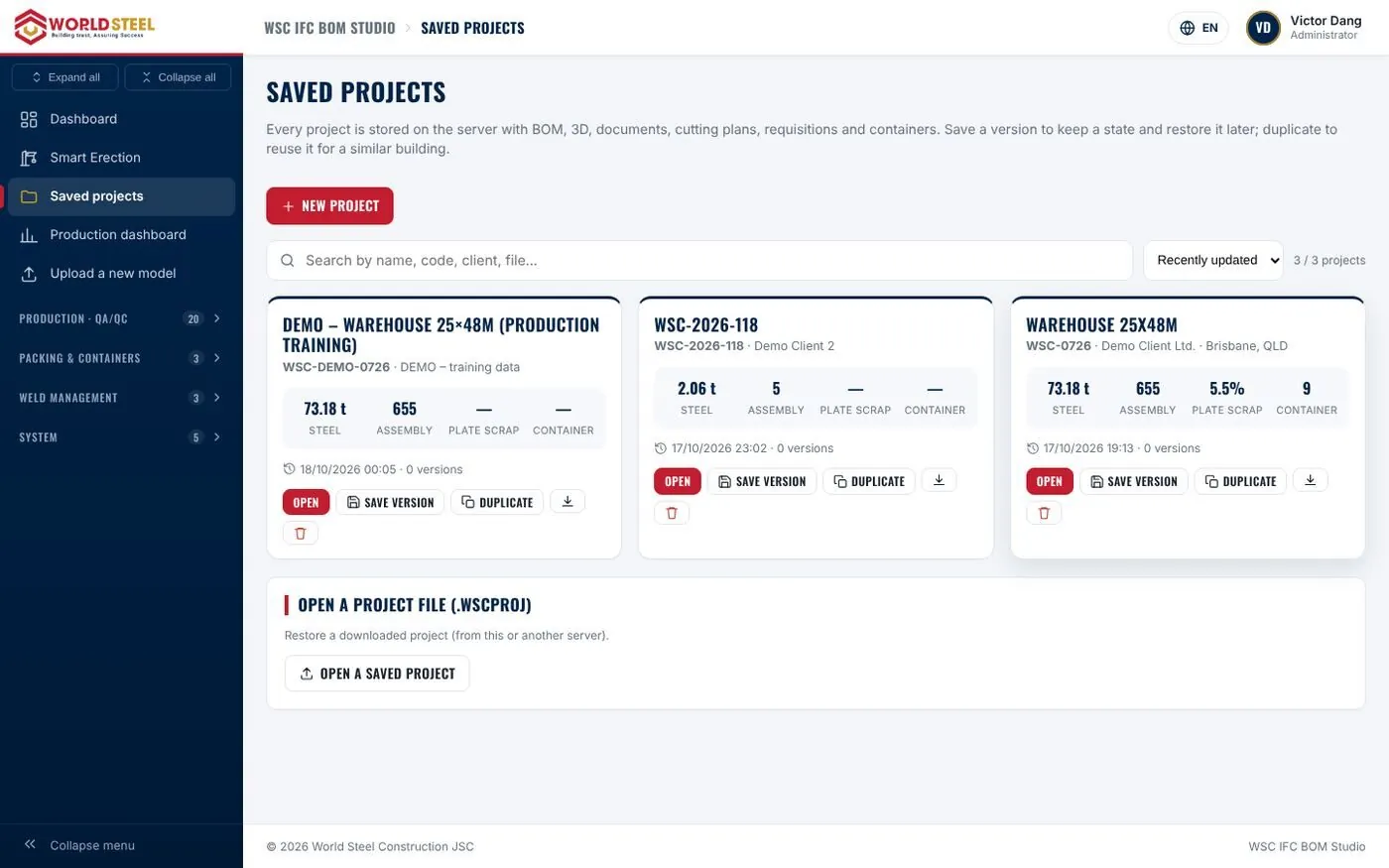
Every release (quotation, production Rev.A…) is captured as a restorable version. Duplicate similar projects with all settings, or archive them as a portable project file.
Departments & permissions
Switch each function module on or off. Default departments with View / Edit rights per module, individual overrides and an “effective rights” view — enforced on the server.
Public display & system check
Control exactly what is published through links and QR codes, and verify PHP, extensions, upload limits, folder permissions and security configuration at a glance.
Demo & training data
Install a complete sample project with one click — crews, workers, 20 days of reports, weld logs and containers — to train staff without touching live data.
B
Tekla IFC analysis & BOM
Assemblies, parts, material take-off, bolts, welds, browser 3D and linked PDF / DXF / NC drawings.
Why it mattersThe single source of truth for the whole system. From one IFC file, estimating, procurement, workshop, QC, logistics and site work from the same verified data set — no more hand calculations or copying between Excel files.
Upload a whole Tekla folder
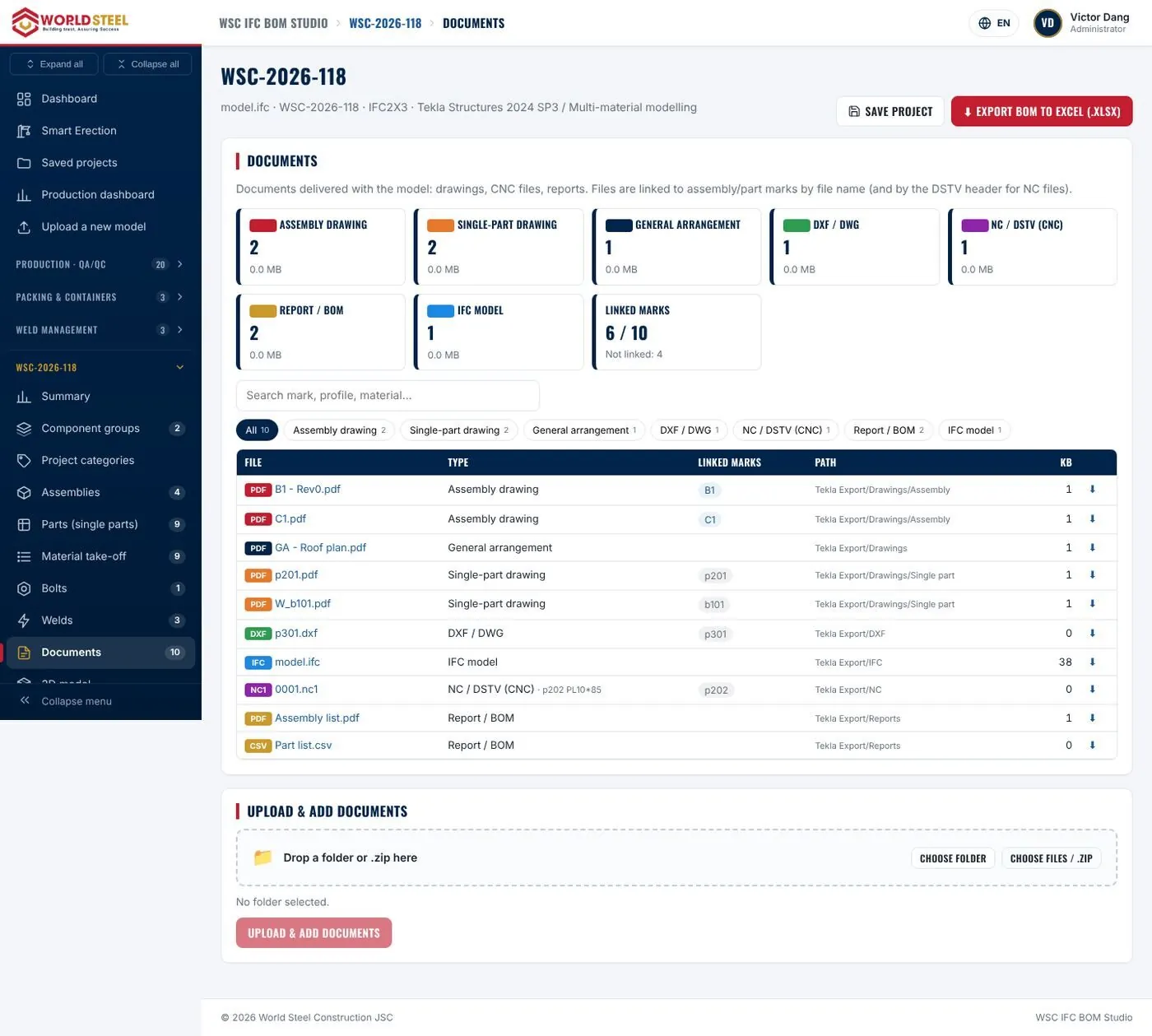
Drag and drop the exported folder or a ZIP: files are sent in 8 MB chunks so server limits never apply, and PDF / DXF / NC drawings are linked to the right marks automatically.
Model summary & data checks
Key figures plus warnings by severity — outdated numbering, duplicate marks with different geometry, wrong material assignments — caught before they reach purchasing.
Automatic component groups
Structural steel, C/Z purlins, rods and tie rods, bolts and non-steel items are recognised automatically, each with its own lists, 3D view and exports.
Assembly, part, MTO and bolt lists
A detailed BOM down to each part mark with dimensions by shape, weights, areas and weld lengths — filter, search and sort instantly with live totals.
Weld detection from 3D geometry
The IFC contains no welds, so PEB Studio derives weld locations, types and lengths from contacts between parts — ready for consumable and labour estimates.
Full 3D in the browser
Rotate, section, measure and capture the complete structure without Tekla. Large models are compressed (46 MB → 4 MB) and touch-friendly on phones.
Drawings & fabrication files
View DXF plates and NC / DSTV headers directly; NC files are matched by the piece mark inside the file, not by file name.
Excel BOM with live formulas
An 8-sheet workbook with real formulas, filters and frozen headers — ready for quotations, purchase requests and client reconciliation.
C
Cutting plans & material requisitions
Plate and section nesting with a 3 % scrap target, Bodor-ready DXF and signed material requisitions.
Why it mattersMaterial scrap is a direct cost. PEB Studio builds cutting plans with a 3 % scrap target, calculates exactly how many sheets and bars to buy, returns usable remnants to stock and produces a signed material requisition — shortening the time from drawing to purchase order.
Scrap-reduction levers
True contours from the IFC including holes, pairing turned 180°, slit strips, remnant re-use, press-brake angles and smart optimisation (ruin & recreate + simulated annealing).
Plate & section cutting results
Sheets and bars to buy per steel type, splice lists with automatic checks and scrap against target — green when achieved.
Bodor-ready PDF & DXF
DXF R12 with CUT_OUTER, CUT_INNER, MARK, SHEET and REMNANT layers for BodorCAM and CypCut, plus a PDF with the part-mark table under each layout.
Material requisitions
One requisition per steel type with standardised material codes, yields and a three-level signature block — printable or exported to Excel.
D
Project record & client sharing
One project record, team in charge, client project page and branded PDFs with signed QR codes.
Why it mattersEvery exported document draws on the same project record, so they are always consistent. Clients get a professional project page where they follow progress and reach the right person in charge.
Project record & team in charge
General, client & site, team, requisition, dispatch (Incoterms, ports, vessel, shipping marks) and signatures — entered once, reused everywhere.
Client project page
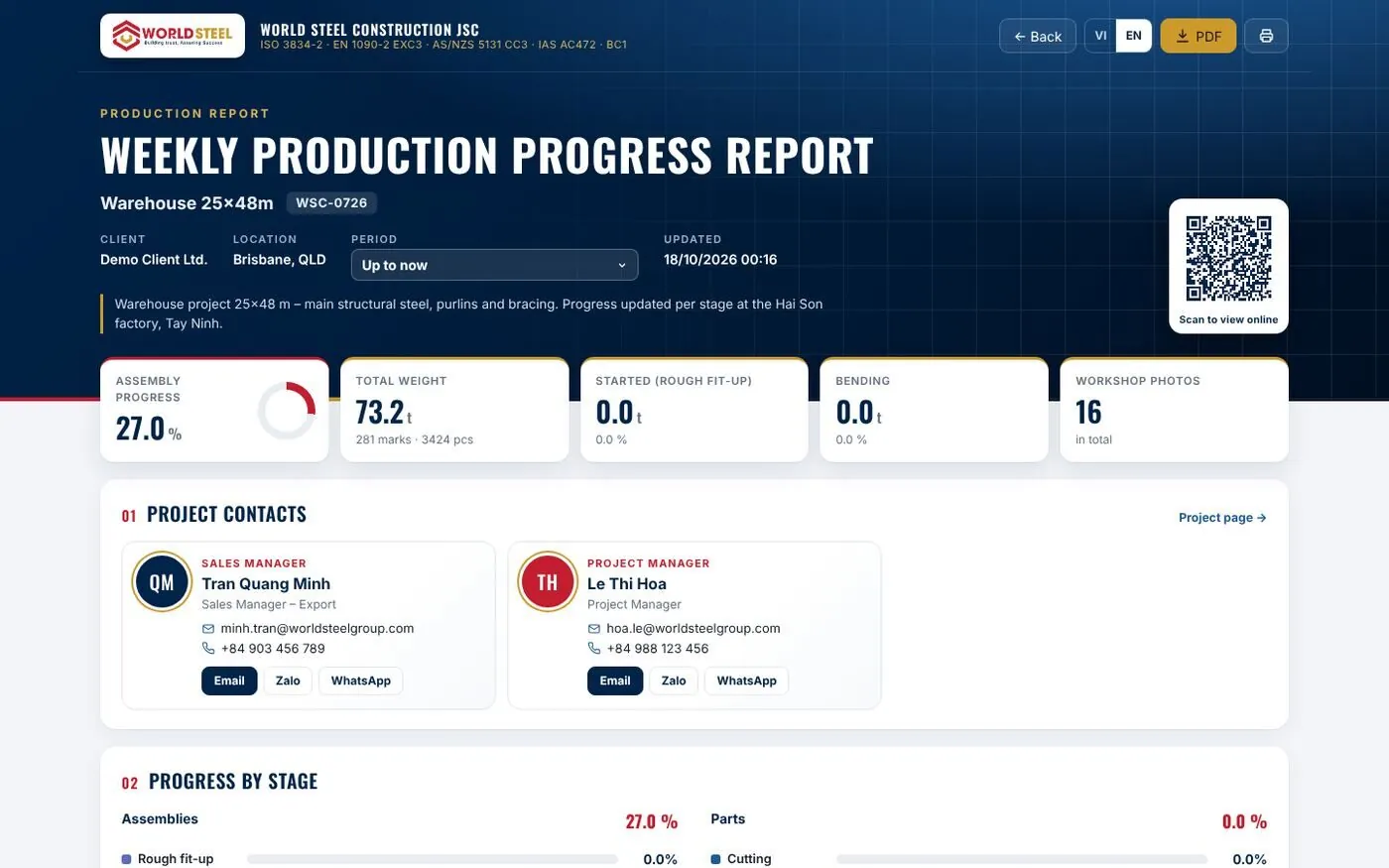
Clients scan a QR code to see the overview, production progress and latest photos, and contact Sales or PM by e-mail, phone, WhatsApp or Zalo.
Branded PDFs with signed QR
Every page carries your brand, certifications and an HMAC-signed QR that opens the current online revision — preventing forgery.
Project categories
Group components as project people think (columns, rafters, bracing, purlins…) to analyse tonnage, coating and welding share for pricing and comparison.
E
Production reporting & QR labels
Progress by tonnage and stage, colour-coded 3D, workshop photos, weekly client reports and QR labels.
Why it mattersClients and management see real progress by tonnage, with photos and a colour-coded 3D model — no need to phone and ask. Every component carries a QR label for look-up and on-the-spot reporting.
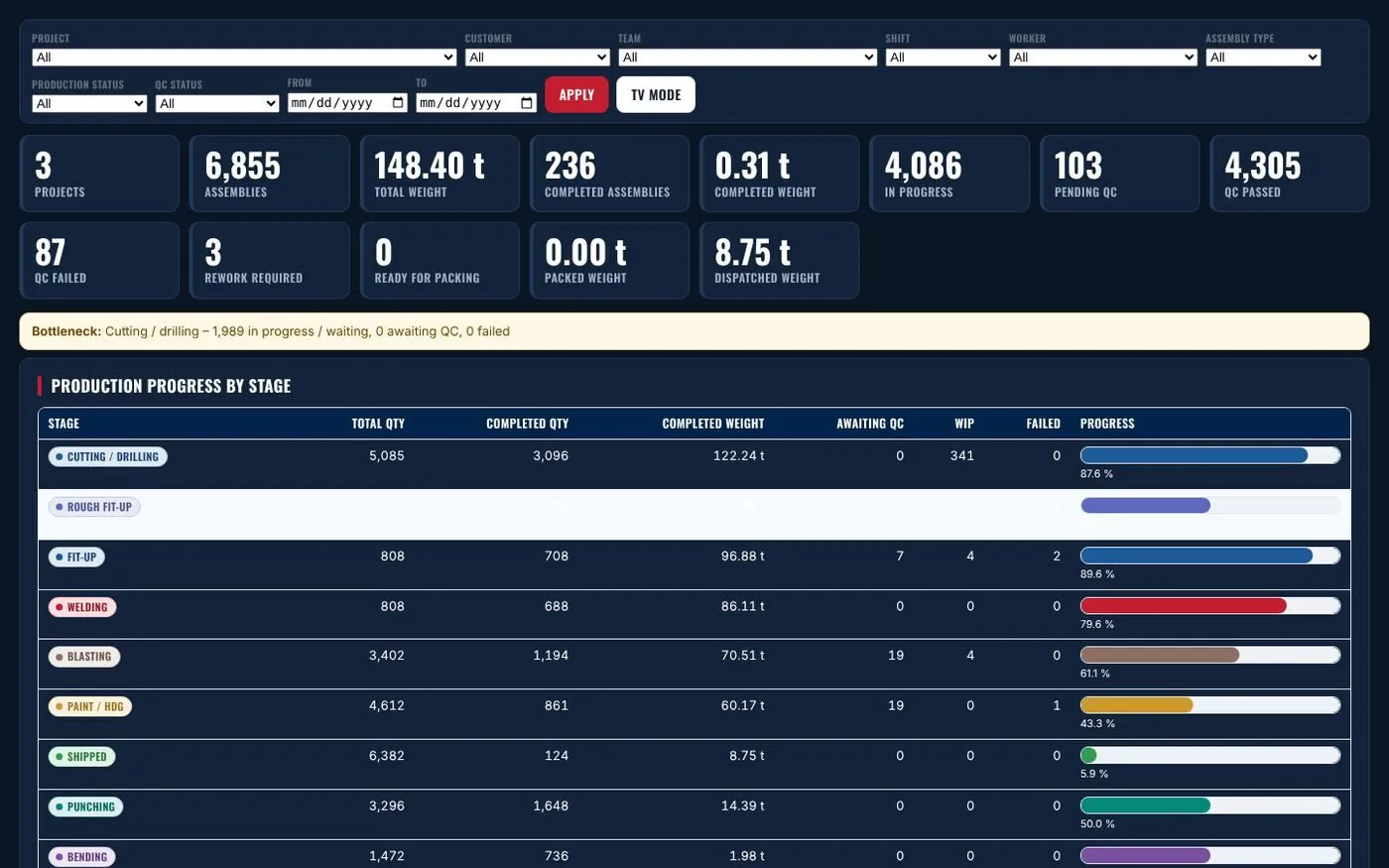
Progress by stage, in tonnes
Cutting to shipped, configurable per project; tick a cell or enter partial quantities and watch the 3D model colour by the highest completed stage.
Periodic client reports
Weekly or monthly reports sent as one signed link — KPIs, progress, colour-coded 3D, photos and a status table, in VI / EN.
Workshop photos
Upload in bulk from phones; photos are filed by stage and period automatically, rotated, resized and searchable by mark.
Factory-wide progress dashboard
Tonnes welded and shipped this week, projects behind schedule and an 8-week trend — for the daily briefing.
Process & QC hold points
Each project gets its own route (e.g. tack-up for built-up girders) and HOLD points that stop later stages exceeding the quantity accepted by QC.
Production labels & shipping tags
One QR label per physical piece in standard or custom formats; scanning shows progress, bundle, container and drawings.
F
Production · QA/QC & traceability (MES)
Scan-to-confirm on the shop floor, QC hold points, NCRs, WPS-controlled welding and a full audit trail.
Why it mattersTurns production reporting into an auditable quality record: who did the work, when, to which WPS, and at which attempt QC passed — meeting the traceability requirements of EN 1090-2, ISO 3834 and AS/NZS 5131.
Operating principles
Production complete ≠ QC passed; scanning a QR grants no rights; history is never overwritten; output is never double-counted.
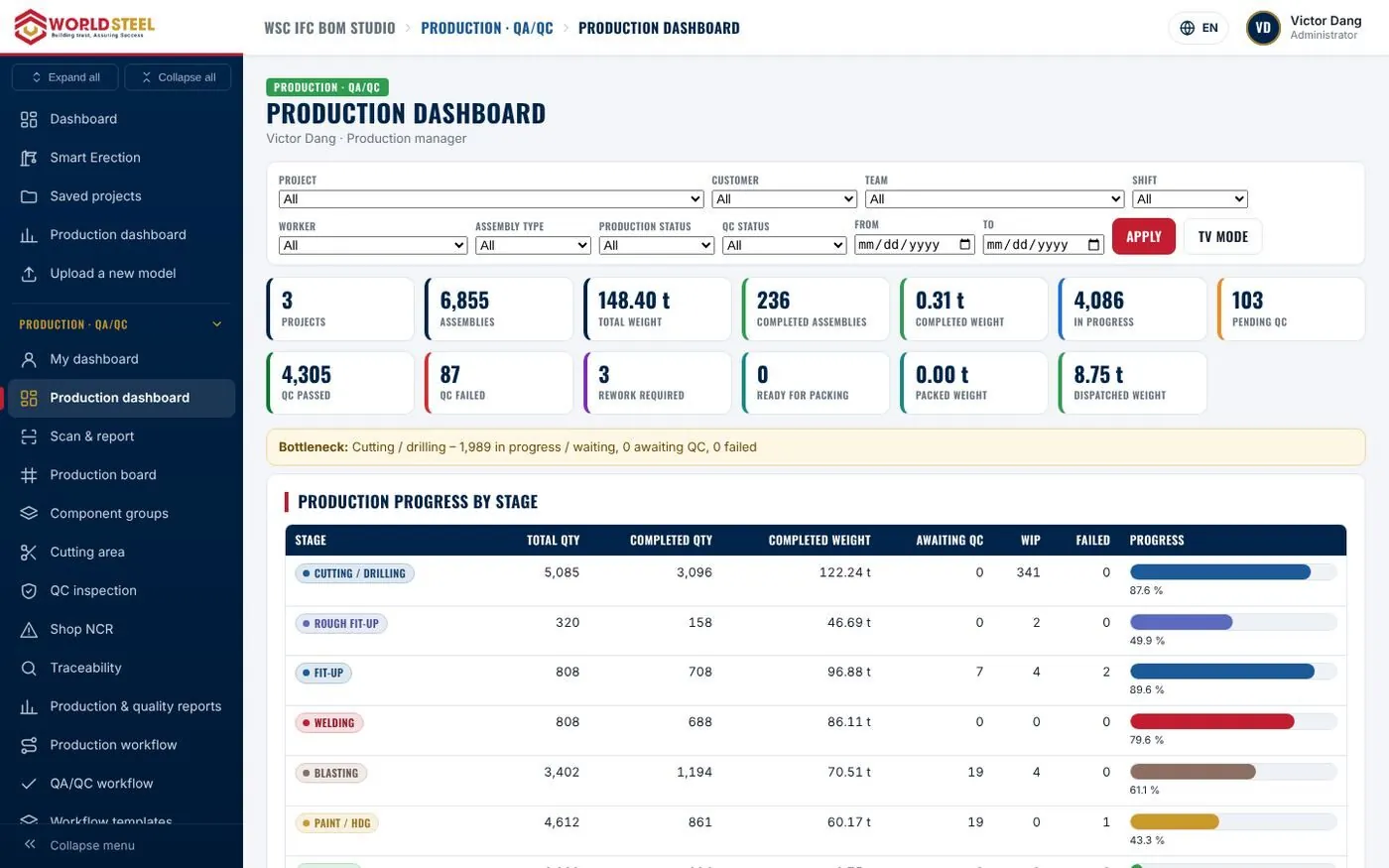
Production dashboard & TV mode
KPIs, bottlenecks, team performance and Gantt — plus a dark, large-type TV mode refreshed every minute for the workshop.
Scan to confirm on the shop floor
Scan → view → tick → done. The system picks the team’s next stage and blocks confirmation when the previous one is not finished or awaiting QC.
Welding reports by WPS
Every weld recorded against the right welder, WPS revision and valid qualification; expired or out-of-range qualifications are rejected by the server.
Workflows & production board
Company and project workflow templates with dependencies, hold points and required photos — and a 9-colour board for every single piece.
QA/QC queue & NCR
Inspect to ISO 5817, AWS D1.1, AS/NZS 1554.1 or EN 1090-2; every FAIL is kept as evidence and NCRs flow OPEN → CORRECTIVE ACTION → RE-INSPECTION → CLOSED.
Workers, teams & positions
Worker profiles with QR cards, teams with leaders and supervisors, and a personal dashboard for every position.
WPS, PQR & welder qualifications
Draft → Approved → Withdrawn WPS revisions, WPQR ranges and 6-month continuity with early expiry warnings.
Traceability & audit log
Answer any audit question in seconds: who made this component, to which workflow, and at which attempt QC passed.
G
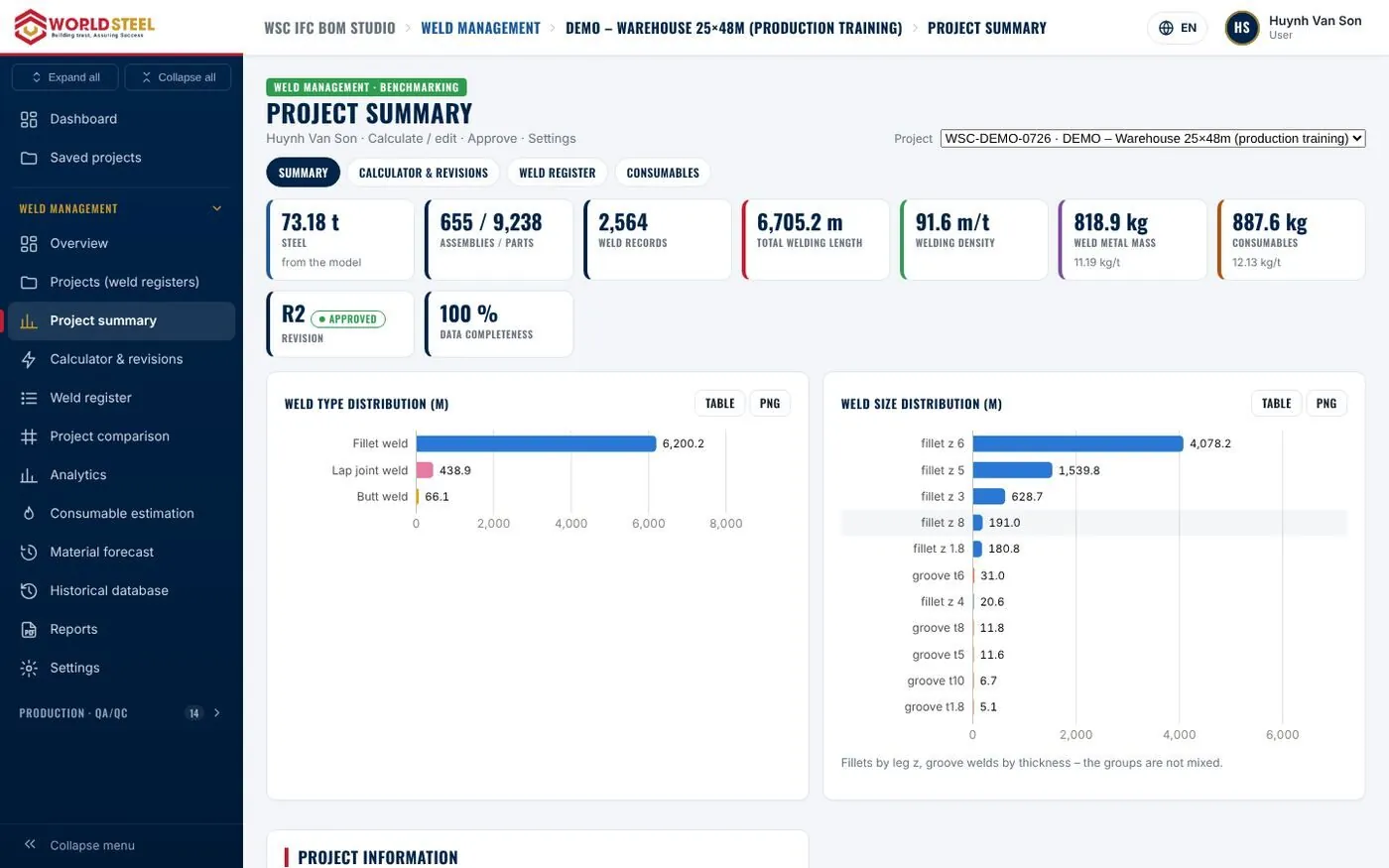
Weld management & benchmarking
Weld register with revisions, deposited metal, consumables and cost, and forecasts from similar projects.
Why it mattersTurns weld data into a decision-making tool: consumable rates (kg/t) and weld density (m/t) against similar projects, plus quick forecasts for quotations. Approved data is locked and every change is logged.
Portfolio overview
Weld metrics normalised per tonne of steel across all projects, filtered by client, country, year and type.
Revisions, verification & approval
Every model change creates a new revision; approved revisions are locked, and two revisions can be compared weld by weld.
Detailed weld register
Weld type, joint type, size, position, process and WPS — with bulk editing, CSV import and optimistic locking.
Consumables & welding cost
Deposited metal, wire, flux, gas and preliminary hours per process with transparent formulas; missing inputs are flagged, never treated as zero.
Comparison & forecasting
Compare 2 – 20 projects to a baseline and forecast consumables for a new project as a range with a confidence level.
Reports A – H
Professional welding reports with register numbers, revisions and prepared / checked / approved blocks, plus Excel with formulas.
H
Packing, packing lists & containers
Sub-PKL packages, QR scan-to-pack, 2D/3D loading planner, sealed releases, shipping marks and site receiving.
Why it mattersExport cargo is controlled down to each component: nothing packed short, nothing loaded into the wrong container, nothing shipped that has not passed QC. Clients check cargo by scanning a QR code, and the site knows which packages to unload first.
Packing dashboard & PKL editor
Project → shipment → container → package hierarchy; only fabricated, QC-released, coated and non-held components can be packed.
QR scan-to-pack
SCAN → CHECK → CONFIRM → SAVE, with instant alerts for the wrong package, wrong container or a component packed elsewhere.
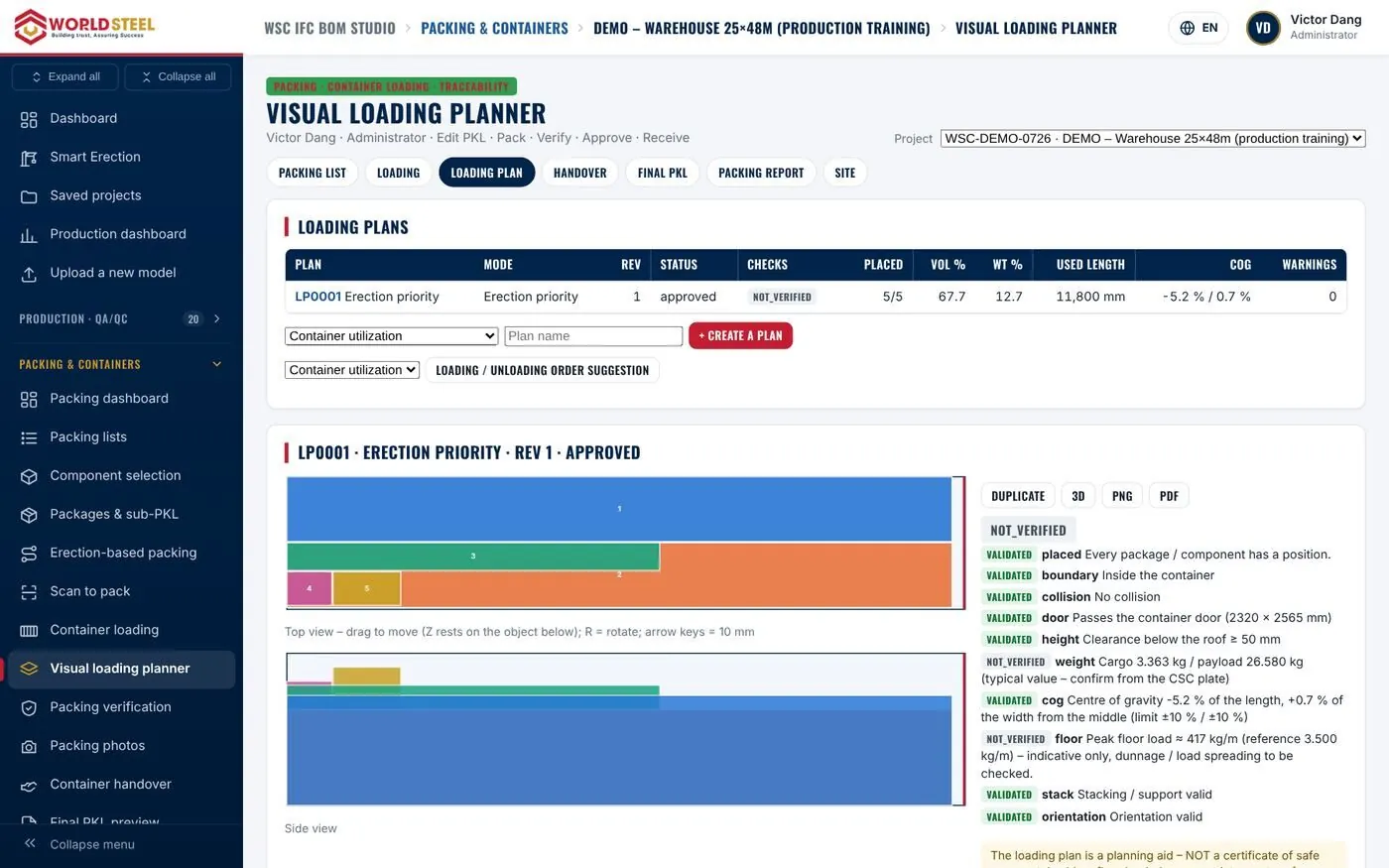
2D / 3D loading planner
Drag packages on plan and elevation views while collisions, door and roof clearance, payload, centre of gravity and stacking are checked.
Sealed, immutable release
Final packing lists are SHA-256 snapshots; changes require an amendment with reason and approval. Packing photos are reviewed before publishing.
Digital container handover
A 10-point checklist cross-checked with system data and signatures from supervisor, logistics and driver, stored as a hashed PDF certificate.
Client packing lists in 19 languages
A clean client template without internal information, a QR per package, and AI translations that must be reviewed before release.
Shipping marks & container reports
UN/ECE Rec. 15 marks with ISO 780 symbols, and a container packing report with VGM, 7-point inspection, securing, photos and videos.
Site receiving
Check the seal on arrival, scan each package, report shortages and damage with photos — unscanned packages create a discrepancy.
I
Smart Erection
Component passports, status-coloured BIM, erection sequence, 4D schedule, field app and digital handover.
Why it mattersExtends traceability from the factory to the installed position and acceptance: every component knows its package, container, yard, grid, erection step and acceptance status — and the handover dossier is generated automatically.
Erection dashboard
Fabricated, shipped, delivered, installed and accepted quantities, NCRs, missing components and the planned vs. actual curve on one screen.
Component digital passport
Scan any label for the full passport — engineering, fabrication, QC, logistics, position, inspections, NCRs and photos.
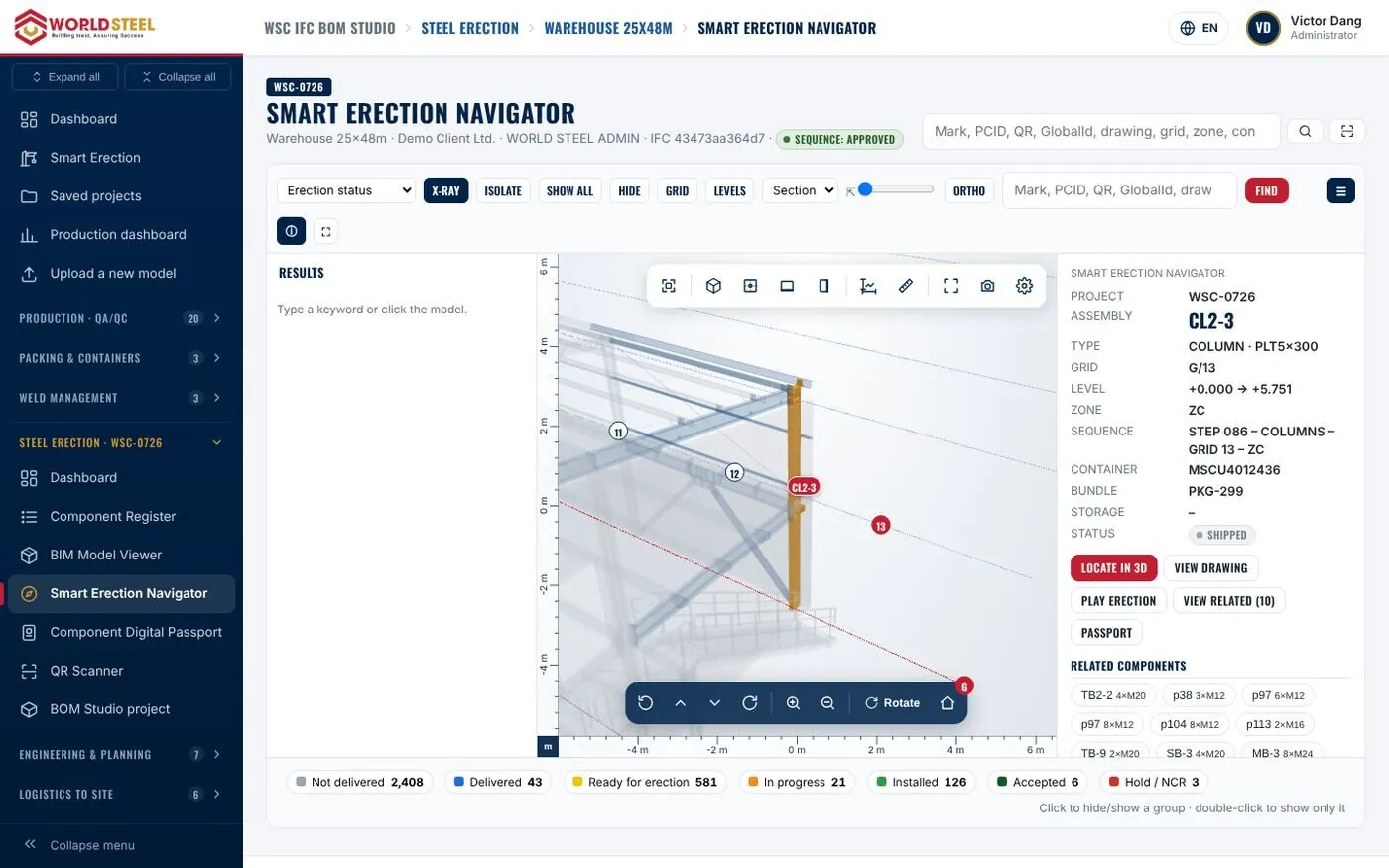
Navigator & status-coloured BIM
Enter or scan a mark and the camera flies to its location, with grid, elevation, step, container and yard shown.
Grids, coordinates & zones
Positions in site language (G/13, A/1–3) read from IfcGrid or created manually, with zones tracking delivered, installed and accepted %.
Erection planning & 3D player
A sequence proposed from geometry with CPM dependencies, installation guides per step and a step-by-step 3D simulation.
4D schedule & progress updates
Plan vs. actual on the model day by day; the person updating progress cannot accept their own work.
Inspection, NCR & drawings
11 inspection types, technical issues tracked to closure and drawing statuses from draft to as-built, with DRAWING HOLD protection.
Client portal & field app
Invite clients to their own project or share scoped links with expiry and PIN; the PWA field app works offline and syncs safely.
Digital installation handover
Partial, zone or final handover dossiers generated from data — 16 PDF reports plus Excel, versioned with a SHA-256 manifest.
J
Security, data & governance
Server-side permissions, signed QR codes, segregation of duties, append-only history and safe upgrades.
Why it mattersThe principles that apply to every module keep data trustworthy, safe to share outside the company and always recoverable.
Optimistic locking & de-duplication
When two people edit at once, the second is asked to reload. Scans and uploads carry an idempotency key, so a double tap never records twice.
Filtered external sharing
Client copies, share links and public QR views contain only released documents and published media — no internal remarks, QC details or prices.
Storage, backup & migration
Write locks, atomic writes and automatic backups; every upgrade has a dry-run migration, a backup and a rollback.
Responsible AI
Only label templates are sent to AI translation, the key is encrypted with AES-256-GCM, and machine translations must be approved.
See your own model in PEB Studio
Send us an IFC export and we will walk your team through BOM, cutting plans, production tracking and packing on your project.